
Make production information easy to see and understand. Explore sample Andon board layouts for production targets, actual output, line status, and downtime alerts. Salescaster® will help you define the information your team needs and discuss an appropriate display configuration for your application.
Request an Andon Board Layout Call 800-346-4474
Andon Board Layout Examples
Start with the decisions your team needs to make: Is output on target? Which line needs attention? Where has production stopped? A focused layout makes the most useful information easy to find.
These conceptual sample layouts use illustrative data. They are not photographs of installed products. Display fields, colors, timing functions, and integration options depend on the selected equipment and project requirements.
Production Target vs. Actual
| Target | 500 units |
|---|---|
| Actual | 475 units |
| Variance | −25 units |
Show planned output alongside completed units so the team can see progress during a shift. A variance field highlights the difference between target and actual.
Suitable application: a production cell or assembly line with a defined output target.
Discuss: unit labels, shift identification, target updates, and count reset rules.
Multi-Line Production Status
| Line | Status |
|---|---|
| 1 | Running |
| 2 | Needs material |
| 3 | Stopped |
Compare several lines or stations in one view. Pair each status color with a written label so the meaning remains clear without relying on color alone.
Suitable application: an area where supervisors monitor multiple production lines.
Discuss: station names, alert categories, message priorities, and update sources.
Downtime and Assistance Alerts
| Status | Stopped |
|---|---|
| Assistance | Maintenance |
| Downtime | 00:12:30 |
Identify the affected station, the type of assistance requested, and elapsed downtime where the selected system supports it.
Suitable application: a work area where maintenance, material, or quality teams respond to interruptions.
Discuss: how alerts start, who clears them, and how elapsed time is calculated.
Takt Time and Production Output
| Takt time | 60 s |
|---|---|
| Elapsed cycle | 48 s |
| Output | 120 units |
Place the required production pace beside elapsed cycle time and output count, where supported. Takt time represents available production time divided by customer demand; elapsed cycle time measures the current cycle.
Suitable application: a repetitive process where teams monitor production pace.
Discuss: timing inputs, takt calculations, cycle triggers, and reset behavior.
Choosing the Information to Display
Prioritize the information operators need to act on immediately. Use clear field names, consistent units, and a predictable order. Reserve prominent space for active problems; place supporting shift or station information where it remains easy to identify.
- Operators: current status, required assistance, production count, or cycle timing.
- Supervisors: target versus actual output and the status of several lines.
- Response teams: station identification and the reason for an alert.
Display Size, Viewing Distance, and Mounting
The layout should be readable from the locations where people work. Tell Salescaster the viewing distance, available mounting space, lighting conditions, and whether information must be visible from one or both sides. The number of fields and length of messages affect the space required.
Character size, display dimensions, mounting arrangements, and environmental suitability should be confirmed for the recommended model before ordering.
Data Sources and Integration Requirements
Identify where each value originates and how often it must change. Your project may involve operator input, production equipment, or existing software. Salescaster® can review the intended data source and display requirements to determine the appropriate approach.
Provide the equipment or software name, available interface, and an example of the data to display. PLC, HMI, SCADA, network, and timing compatibility must be checked for the chosen configuration.
Explore Andon board displays and visual alert systems and industrial LED production displays for more information.
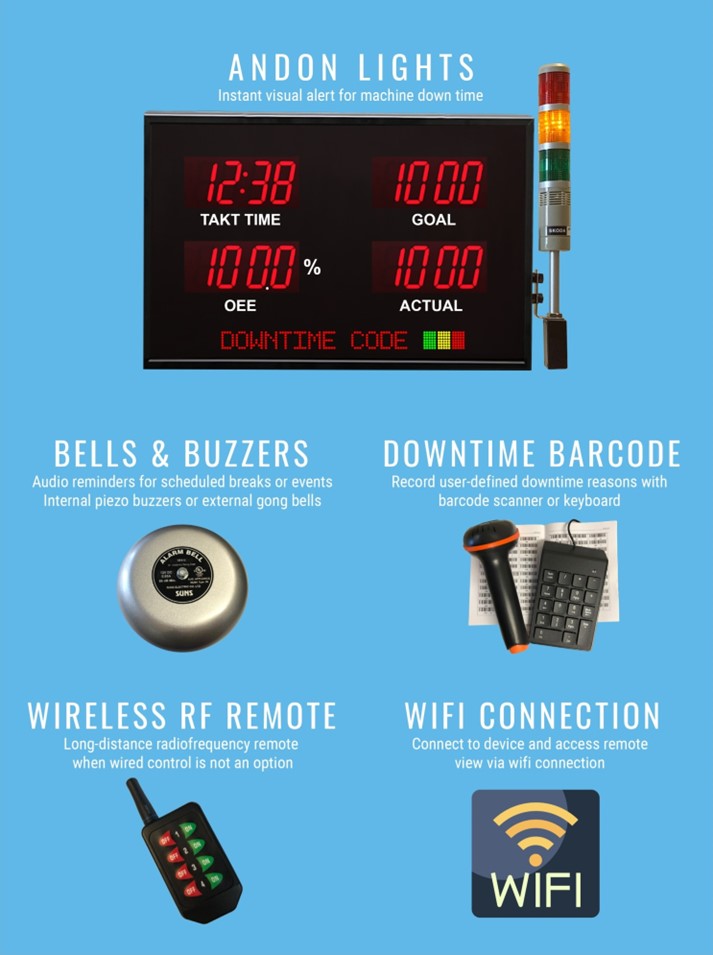
Salescaster Andon Display Illustration
Frequently Asked Questions
What information should an Andon board show?
Start with line or station identification, operating status, and the information needed for a timely response. Add target, actual output, variance, or timing fields when they support your process.
Can one layout show several production lines?
A multi-line concept assigns a row or section to each line. The appropriate number of lines depends on display size, viewing distance, and the amount of information shown.
Can an Andon board connect to our existing system?
Compatibility depends on the selected display, available interface, and application. Share your equipment and software details so the integration requirements can be reviewed.
Request a Layout and Quote
Tell us what your team needs to see. For a useful starting point, include:
- Number of production lines or stations.
- Required fields, messages, units, and alert categories.
- Approximate viewing distance and installation location.
- Mounting space and whether one-sided or two-sided viewing is needed.
- Intended data source, equipment or software details, and update frequency.
Request an Andon Board Layout Call 800-346-4474
The Salescaster Advantage
Every business has unique needs and priorities. Salescaster helps customers define their requirements and refine their display ideas. Call 800-346-4474 to discuss your Andon board layout.