
Keep time across locations visible at a glance. Salescaster LED time zone clocks bring the times that matter to your team together in one display, with custom zone labels and a choice of digit sizes.
Planning a digital world clock display for an office, control room or operations center? Share your locations and installation requirements so we can help you select a layout. For calendar clock projects, ask us to confirm the date and day display options for your application.
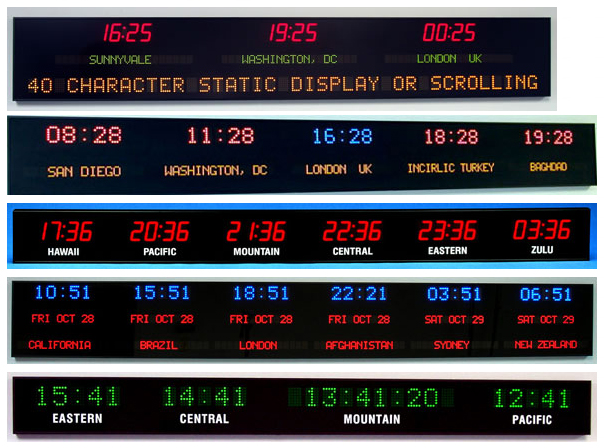
A Time Display Built Around Your Locations
Coordinate Across Offices
Give staff a shared reference for planning calls and handoffs between locations in different time zones.
Support Operations Teams
Plan a display for a dispatch area or control room where teams need to reference several local times.
Make Labels Easy to Read
Specify the cities, time zones or facility names your team uses so the layout matches your daily workflow.
LED Clock Options and Specifications
Use these published options as a starting point. Salescaster will confirm the configuration for your quoted clock.
| Feature | Published Options |
|---|---|
| Digit height | 1.8″, 2.5″ or 4″ |
| Time display | 4 digits for hours and minutes; 6 digits for hours, minutes and seconds |
| Time format | Selectable 12-hour or 24-hour format |
| Zone labels | White vinyl lettering or electronic LED lettering |
| Configuration | Time zone settings through a wireless remote control |
| Daylight saving time | Selectable automatic international correction; confirm coverage for your selected locations |
| Construction | Anodized aluminum frame and non-glare lens |
| Timekeeping | TCXO real-time clock and lithium battery backup; confirm model-specific accuracy and battery life |
| Calendar display | Ask Salescaster to confirm available date and day formats for your project |
Plan Your Custom Time Zone Clock Layout
Start with the locations your team needs to see, then choose the labels and display arrangement. Digit height should suit the intended viewing distance and available wall space. Send a photo of the installation area to help us evaluate a suitable layout.
What to Include in Your Quote Request
- Cities, time zones or facilities to display
- Number of time displays and preferred arrangement
- Approximate viewing distance and available mounting space
- 12-hour or 24-hour format, and whether seconds are needed
- Vinyl or LED labels, and any calendar display requirements
- Installation location and any required synchronization or system connections
Frequently Asked Questions
Can I choose the locations shown on a time zone clock?
The published range supports custom zone layouts and labels. Send Salescaster your requested locations and label text to confirm a suitable configuration.
Can the clock show seconds or use a 24-hour format?
The listed options include hours and minutes or hours, minutes and seconds, plus selectable 12-hour and 24-hour time formats.
Does the clock adjust for daylight saving time?
Selectable automatic international daylight saving correction is listed. Ask Salescaster to confirm support for each of your locations, including any local exceptions.
Which calendar information can be displayed?
Tell us which date and day information you need to display. Salescaster will confirm the available formats and appropriate model for your project.
Can the clock connect to my network or master clock system?
Connection and synchronization methods must be confirmed for the selected equipment. Describe your existing system when you request a quote.
Related Clock and Display Solutions
Explore the Alpha Serial Clock for another clock option, or government and military display applications. Contact Salescaster to discuss which equipment fits your project.
Discuss Your Time Zone Clock Project
Tell us what your team needs to see and where the display will be installed. Salescaster can help turn your requirements into a practical clock layout.