Salescaster® industrial LED Production Displays provide real-time visibility into manufacturing operations, including production counts, target versus actual output, TAKT Time, cycle time and equipment status, when supported by the selected configuration. Display production targets, totals and statistical information where your workforce can see it.
Choose a production display around the viewing distance, the information your team needs to see and the installation environment. Salescaster® can help review your available mounting space and preferred message layout before recommending a configuration.
Production Display Connectivity and Programming
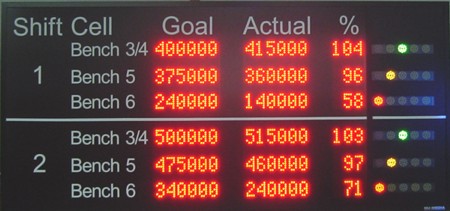
Depending on the selected system, production information can be updated through direct PLC serial data input or a Windows program that reads external files. These approaches may avoid the need for additional event-driven PC software. Confirm interface, software and update requirements for your application.
For PLC-connected production displays, Salescaster® recommends identifying the PLC manufacturer, model, available communication interfaces, required display information, and update frequency. Our engineering team can review these details to help determine a suitable display configuration and connection method.
Programmable or Automated Production Displays
Salescaster® industrial Production Displays help teams monitor production progress and communicate operating information across the factory floor. The displayed values and update frequency depend on the configured data source and controls.
Our engineering staff can help configure programming fields so the LED display automatically shows the targets, totals and statistical data your workforce needs.
Selecting an Industrial LED Production Display
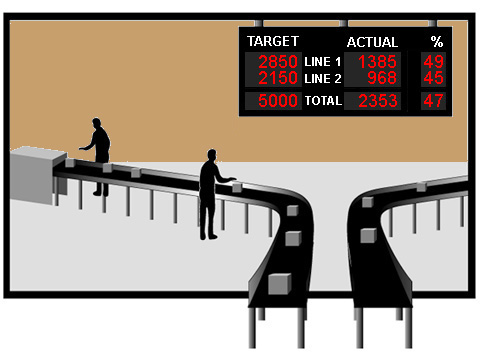
When selecting an industrial LED production display, consider the viewing distance, number of information fields, available mounting space, and installation environment. Communication interfaces and data update requirements should also be evaluated. Salescaster® can help determine an appropriate display configuration based on your application.
Industrial Production Display Features
- Configurable by push button, keypad or terminal.
- Contact closure and voltage-source inputs.
- Sensor-input configurations are available; contact Salescaster® to confirm sensor, signal and display compatibility for your application.
- PLC and AC input options.
- Configurable debounce.
- Conditional programming.
- Optically isolated inputs.
- ANSI terminal compatibility.
Share your PLC brand, model, available interfaces and input requirements with Salescaster®. If the project involves an HMI or SCADA application, include the software version and how often the display data must update. We can review the appropriate connections, programming and any project-specific engineering before recommending a configuration.
Benefits for Factory Floor Communication
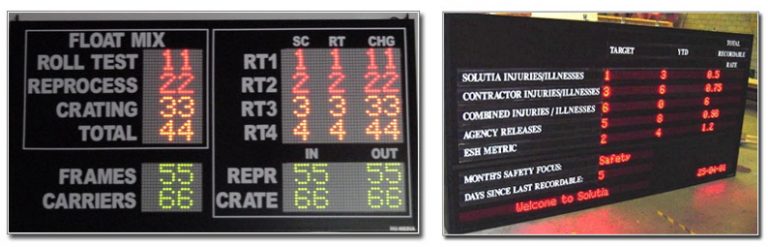
- Production monitoring displays that may also support ANDON status messaging when configured for the application.
- Show production data in real time and calculate shift efficiencies and production targets.
- Link data to a Windows-based spreadsheet or database, with formulas controlled through simple text files.
- Support efficiency, communication and workplace safety.
- Configure displays through your network using a workstation or handheld device, as supported by the selected system.
- Display critical information, including production status or traffic management messages.
Related Industrial Display Solutions
Production Displays primarily communicate output and performance, while ANDON Boards emphasize operating conditions that need attention. Some configurations can serve both purposes. Explore our TAKT timers and production counters and Goal & Actual Production Counters for applications focused on production timing or target-versus-actual output.
For broader performance and downtime visibility, see Production Monitoring and Downtime Tracking. These visual tools can also support Lean Manufacturing initiatives by keeping production information visible to employees.
Industrial Production Display FAQs
What information can an industrial production display show?
Displays can show production targets, totals, statistical data and production status. The information shown and any calculations depend on the programming and configuration selected for your application.
How can the display receive production updates?
Depending on the selected configuration, updates may come from a PLC serial connection or a Windows program that reads external files. Provide your data source, available interface and required update frequency so Salescaster® can review the appropriate connection method.
What control and input options are available?
Depending on the model and configuration, input options may include push buttons, keypads, terminals, contact closures or voltage sources. Debounce settings, conditional programming and optically isolated inputs may also be available. Confirm the required functions with Salescaster® before selecting a system.
Can the display work with my PLC?
Send Salescaster® your PLC brand, model and available serial interface, along with the data you want to display. Our Automation Team can review the connection and programming requirements for your specific equipment.
Can production data come from a spreadsheet or database?
Production display configurations can link data to Windows-based spreadsheets or databases, with formulas controlled through simple text files. Share your software and file requirements so Salescaster® can review the appropriate setup.
What information should I provide for a quote?
Tell us what information the display should show, such as production targets, actual output, totals or status messages. Include the viewing distance, installation location, available mounting space and preferred display dimensions. If the display will connect to a PLC, provide the manufacturer, model, available communication interface and required update frequency. Photographs, layout sketches and details of any other data sources or input devices can help our team evaluate your application.
The Salescaster® Advantage
We help customers define their needs and refine their ideas, recognizing that every business has unique priorities. Speak with a specialist from our Automation Team about your industrial production display and dynamic visual communication requirements.