Connect compatible ALPHA LED signs to your own software. The ALPHA LED sign communication protocol lets developers send messages, schedule content, and update electronic displays from a PC or other compatible serial-capable equipment. Use it to show production information, customer messages, and operational alerts where people can see them.
Salescaster® Displays Corporation can help you identify the display, communication interface, and software approach for your project. Available commands and features depend on the sign model, firmware, and system configuration.
Contact Us About Sign IntegrationCall 800-346-4474
What Is the ALPHA LED Sign Communication Protocol?
The protocol documentation describes how a software application communicates with a compatible ALPHA electronic message display. Developers can use their own development platform to build messages and control how and when those messages appear.
Potential applications include PC-driven messaging, point-of-purchase displays, and production or alarm messages from a programmable logic controller (PLC) through a suitable communication interface. Confirm the required hardware and commands before starting development.
Message Control and Display Features
Depending on the display and supported protocol commands, available functions include:
- Set the display time and date.
- Create text messages and schedule them by time and day of the week.
- Sequence messages and send content to individual signs or groups of displays.
- Control supported colors, fonts, flashing text, and presentation effects.
- Request sign status and validate transmission packets with a checksum.
- Transmit ASCII-based messages using the format specified in the protocol documentation.
- Use supported graphics, animations, and international characters.
- Display counters showing minutes, hours, or days to an event.
- Include strings, variables, and counters from your application.
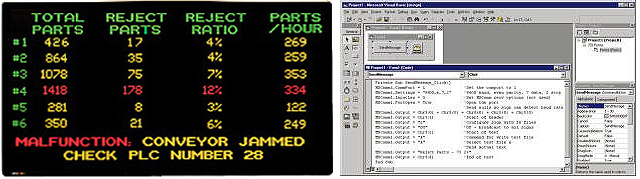
Serial Communication and Display Networks
Serial addressing can help target messages to specific displays. Network arrangements may also involve modems, wireless equipment, or a local area network, using hardware appropriate for the selected sign.
A network connection alone does not establish protocol compatibility. Tell Salescaster® which display you have, how your equipment communicates, and whether you need to update one sign or multiple locations. We can help you evaluate the communication path.
PLC and HMI Alarm Message Integration
In a suitably configured alarm messaging system, user-defined alerts can take priority over normal screen content. Alarm handling may include queued messages, individual or global acknowledgment, acknowledgment through an HMI tag, or automatic acknowledgment when a condition returns to normal.
These behaviors require the appropriate application logic and system configuration. Confirm your PLC or HMI software, display model, message priorities, and acknowledgment requirements with Salescaster before specifying the solution.
Explore Andon board displays and visual alert systems for manufacturing applications.
Custom Protocol Development or AlphaNET Software?
Use protocol-based development when your application needs to generate and send its own display messages. For a messaging software option, review AlphaNET LED sign software. Confirm software and operating-system compatibility for your particular display.
Frequently Asked Questions
Can I send messages from my own software?
Yes, when your ALPHA display supports the documented commands and your software uses the correct communication interface and message format. Confirm the model and protocol documentation before development.
Can I connect an LED sign to a PLC or HMI?
A suitable interface and application logic are required. Compatibility depends on the controller, software, and display. Contact Salescaster with those details to discuss your project.
What information should I provide for a compatibility review?
Include the sign model, controller or PC software, available ports or network interface, number of displays, and examples of the messages or alarms you want to show.
Discuss Your LED Sign Communication Project
Whether you are updating an existing ALPHA sign or planning a new display installation, Salescaster® can help you define your requirements and evaluate the available options. Ask about applicable protocol documentation, software choices, and display integration.
Contact Us / Request a QuoteCall 800-346-4474
Email: sales@salescaster.com